Controller Integration
While OCHRE can simulate a stand-alone dwelling or piece of equipment, it is designed to integrate with external controllers and other modeling tools. External controllers can adjust the power consumption of any OCHRE equipment using multiple control methods. OCHRE can also send status variables to controllers to enable more advanced control strategies. The following table provides an overview of the control signals and status various that OCHRE can send and receive.
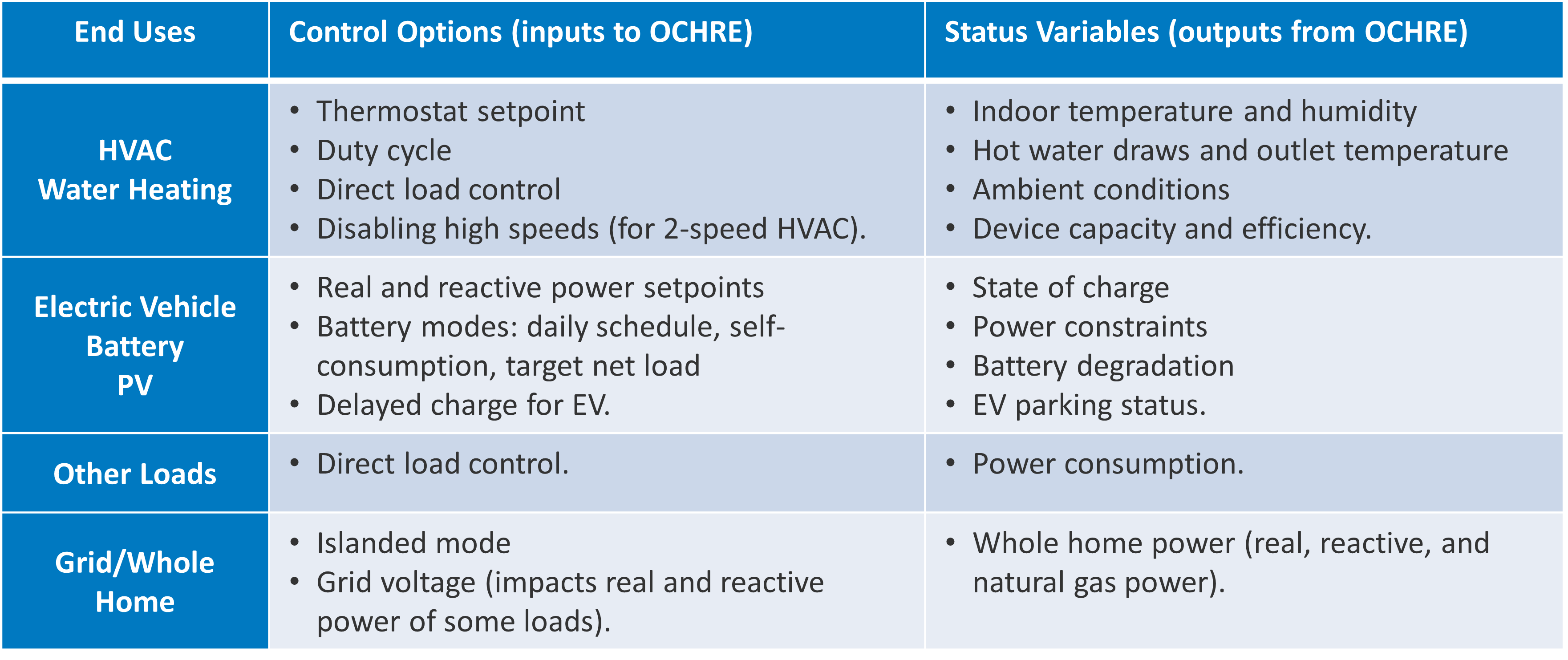
Overview of OCHRE control options and status variables
For example, the code below will create a battery model and discharge it at 5 kW for one time step.
battery = Battery(
    capacity_kwh=10,  # energy capacity = 10 kWh
    capacity=5,       # power capacity = 5 kW
    soc_init=0.5,     # Initial SOC = 50%
    start_time=dt.datetime(2018, 1, 1, 0, 0),
    time_res=dt.timedelta(minutes=15),
    duration=dt.timedelta(days=1),
)

control_signal = {'P Setpoint': -5}      # Discharge at 5 kW
status = battery.update(control_signal)  # Run for 1 time step
See the OCHRE User Tutorial Jupyter notebook or run_external_control.py for example code for multiple end uses.
Equipment Control Signals
The following tables list the control signals that OCHRE equipment can receive, by end use. They include the unit of each control signal, and whether the control signal resets at the end of the time step.
HVAC Heating or HVAC Cooling
Control Command |
Units |
Resets? |
Description |
|---|---|---|---|
Load Fraction |
unitless |
True |
1 (no effect) or 0 (forces equipment off) |
Setpoint |
C |
True |
Sets temperature setpoint |
Deadband |
C |
Only if in schedule |
Sets temperature deadband |
Capacity |
W |
True |
Sets HVAC capacity directly, ideal capacity mode only |
Max Capacity Fraction |
unitless |
Only if in schedule |
Limits HVAC max capacity, ideal capacity mode only |
Disable Speed X |
N/A |
False |
Flag to disable low (X=1) or high (X=2) speed, only for 2 speed equipment |
ER Capacity |
W |
True |
Sets ER element capacity directly, ideal capacity mode only, ASHP Heater only |
Max ER Capacity Fraction |
unitless |
Only if in schedule |
Limits ER element max capacity, ideal capacity mode only, ASHP Heater only |
Water Heating
Control Command |
Units |
Resets? |
Description |
|---|---|---|---|
Load Fraction |
unitless |
True |
1 (no effect) or 0 (forces equipment off) |
Setpoint |
C |
Only if in schedule |
Sets temperature setpoint [1] |
Deadband |
C |
Only if in schedule |
Sets temperature deadband [2] |
Max Power |
kW |
Only if in schedule |
Sets the maximum power. Does not work for HPWH in HP mode |
Electric Vehicle (EV)
Control Command |
Units |
Resets? |
Description |
|---|---|---|---|
Load Fraction |
unitless |
N/A |
1 (no effect) or 0 (forces equipment off) |
Delay |
N/A |
True |
Delays EV charge for a given time [3] |
P Setpoint |
kW |
Only if |
Sets the AC power setpoint |
SOC Rate |
1/hour |
Only if |
Sets the AC power setpoint based on SOC rate, EV capacity, and efficiency of charging |
Max Power |
kW |
Only if |
Equivalent to “P Setpoint” |
Max SOC |
unitless |
Only if |
Maximum SOC limit |
Solar PV
Control Command |
Units |
Resets? |
Description |
|---|---|---|---|
P Setpoint |
kW |
True |
Sets real AC power setpoint |
P Curtailment (kW) |
kW |
True |
Sets real power setpoint by specifying absolute curtailment |
P Curtailment (%) |
% |
True |
Sets real power setpoint by specifying curtailment relative to maximum power point |
Q Setpoint |
kVAR |
True |
Sets reactive power setpoint |
Power Factor |
unitless |
True |
Sets reactive power setpoint based on power factor |
Priority |
N/A |
False |
Changes internal controller priority setting [4] |
Battery
Control Command |
Units |
Resets? |
Description |
|---|---|---|---|
P Setpoint |
kW |
True |
Sets AC power setpoint |
SOC |
unitless |
True |
Sets AC power to achieve desired SOC setpoint |
Self Consumption Mode |
N/A |
False |
Flag to turn on Self-Consumption Mode [5] |
Min SOC |
unitless |
Only if in schedule |
Minimum SOC limit, self-consumption control only |
Max SOC |
unitless |
Only if in schedule |
Maximum SOC limit, self-consumption control only |
Max Import Limit |
kW |
Only if in schedule |
Max dwelling import power for self-consumption control [6] |
Max Export Limit |
kW |
Only if in schedule |
Max dwelling export power for self-consumption control [7] |
Gas Generator
Control Command |
Units |
Resets? |
Description |
|---|---|---|---|
P Setpoint |
kW |
True |
Sets AC power setpoint |
Self Consumption Mode |
N/A |
False |
Flag to turn on Self-Consumption Mode [8] |
Max Import Limit |
kW |
Only if in schedule |
Max dwelling import power for self-consumption control [9] |
Lighting and Other Loads
Control Command |
Units |
Resets? |
Description |
|---|---|---|---|
Load Fraction |
unitless |
True |
Multiplier to adjusts the scheduled power consumption. Applied to electric and gas power |
P Setpoint |
kW |
Only for |
Sets electric power setpoint |
Gas Setpoint |
therms/hour |
Only for |
Sets gas power setpoint |
Delay |
N/A |
N/A |
Delays next event for a given time. Only for |
External Model Signals
OCHRE can also integrate with external models that modify default schedule values and other settings.
The most common use case is to integrate with a grid simulator that modifies the dwelling voltage. OCHRE includes a voltage-dependent impedance-current-power (ZIP) model for all equipment that modifies the real and reactive electric power based on the grid voltage.
The following code sends a voltage of 0.97 p.u. to a Dwelling model:
status = dwelling.update(schedule_inputs={'Voltage (-)': 0.97})
External model signals can also modify any time series schedule values including weather and occupancy variables. The names and units of these variables can be found in the header of the OCHRE schedule file. Alternatively, these variables can be set at the beginning of the simulation; see the OCHRE User Tutorial Jupyter notebook for more details.
Status Variables
The update function for equipment and dwellings returns a Python
dictionary with status variables that can be sent to the external controller.
These status variables are equivalent to the time series results described in
Outputs and Analysis. Note that the verbosity applies to
the status variables in the same way as the outputs.
See run_hvac_dynamic_control in run_external_control.py for
an example.
Co-simulation
OCHRE is designed to run in co-simulation with controllers, aggregators, grid models, and other simulation agents. OCHRE models can communicate with other agents via their external control signals, external model signals, and status variables.
See run_cosimulation.py for a very basic co-simulation implementation using the HELICS platform. The example shows a simple aggregator that controls batteries in two different OCHRE dwellings.
OCHRE can also repeat a single timestep with multiple control options, enabling
co-optimization or simulation across varying time-scales. See the
run_pv_voltvar function in run_external_control.py as an
example.
See the Citation and Publications for examples of more advanced co-simulation architectures that use OCHRE.